Test Your Machine Vision
Software Before the Camera Is
on the Production Lin

AIxCam is a configurable virtual industrial camera that generates controlled image streams for your machine vision application through GigE Vision.
Test different acquisition and production conditions, identify limitations earlier, and evaluate your vision software before physical deployment.

  • Virtual Camera
  • GigE Vision
  • Area Scan
  • Line Scan

Why Test Before Deployment?

Machine vision software can behave differently when acquisition and production conditions change. AIxCam gives you a controlled and repeatable environment to evaluate your application before moving to the physical camera or production line.

Test Earlier

Evaluate algorithms and machine vision software before installing the physical camera.

Introduce Variation

Simulate changing image, product, and acquisition conditions.

Find Limitations Sooner

Identify software and performance issues before physical deployment.

"A controlled and repeatable environment for developing, testing, and evaluating machine vision software."

View AIxCam User Manual

What Can You Simulate With AIxCam?

1. Resolution & Frame Size

Test different output image dimensions.

2. Frame Rate

Evaluate your software at different image acquisition speeds.

3. Area Scan / Line Scan

Simulate different industrial camera acquisition modes.

4. Frame Overlap

Create overlap between consecutive image frames.

5. Product Spacing

Control or randomize the distance between products or parts.

6. Position & Rotation

Introduce variation in part placement and orientation.

7. Image Noise

Evaluate algorithm robustness under noisy image conditions.

8. Real Image Inputs

Use your own Background and Foreground images to create synthetic production scenes.

How AIxCam Works

01

Configure the Output

Set image resolution, frame rate, overlap, packet size, and output format.

02

Add Your Images

Choose Background and Foreground image sets from your library.

03

Introduce Variation

Adjust product spacing, position, rotation, and image noise.

04

Start the Simulation

AIxCam generates the virtual scene and creates the required image frames.

05

Connect Your Software

Frames are transmitted to your machine vision application through GigE Vision.

06

Test & Refine

Evaluate performance and adjust your application under different controlled conditions.

From Real Images to a Virtual Production Scene

Your Background Images

Fabric, Metal, Paper, Conveyor Surface, Product Surface

Your Product / Part Images

Representative foreground components, defects, and variations

Scene Configuration:

Spacing Position Rotation Noise

Frame Generation:

Resolution Frame Rate Overlap Area / Line Scan
GIGE VISION STREAMER
Your Machine Vision Application

AIxCam combines your images, applies the configured conditions, generates image frames, and transmits them to your machine vision software.

Use AIxCam Across the Development Process

  1. Initial Algorithm Testing

    Test vision algorithms before installing the actual camera.

  2. Condition Testing

    Compare software behaviour under different image and scene conditions.

  3. Robustness Testing

    Evaluate performance with changes in noise, product position, rotation, spacing, and other image variations.

  4. Performance Testing

    Test your system at different resolutions, frame rates, and transmission settings.

  5. Communication Testing

    Use AIxCam as a virtual GigE Vision camera source for your machine vision application.

Get AIxCam

Access AIxCam and the user manual, and start testing your machine vision application in a controlled virtual-camera environment.

After submitting the form, you'll receive access to the AIxCam software and user manual.

Working on a Real Inspection Application?

AIxCam can help you test and evaluate machine vision software in a virtual environment.

When you move toward a real production deployment, the final inspection system may also depend on camera selection, imaging, lighting, sensing, processing, AI models, line speed, product geometry, and integration with existing production equipment.

AI-Innovate can help evaluate those production-specific requirements and engineer the right inspection approach around your application.
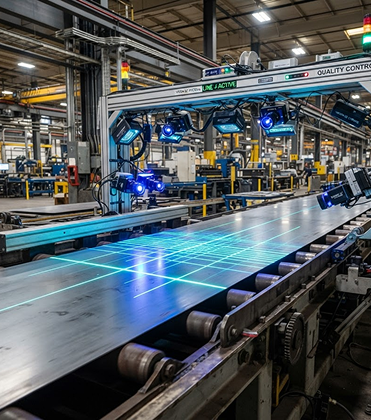
Industrial machine vision inspection of a metal production line
Shopping Basket
