




Every machine vision project starts with the same question, and rarely lands on the same answer twice: does this problem need a compact, all-in-one smart camera, or does it need the scalability and raw compute of a PC-based system? Get the answer wrong and the consequences are not subtle. Choose a smart camera for a problem that later needs eight synchronized cameras and deep learning inference, and you have painted yourself into a corner with a single-socket device that cannot scale. Choose a full PC-based rig for a single, well-defined barcode-reading station, and you have bought far more flexibility, cost, and complexity than the problem ever required.
This is not a new debate. Machine vision engineers have been arguing the merits of each approach since smart cameras first became powerful enough to challenge PC-based systems for real industrial work, and the fundamental trade-offs identified decades ago still hold, even as the hardware on both sides has become dramatically more capable. What has changed is the range each architecture can now cover: smart cameras today embed GPUs with hundreds of CUDA cores and multiple gigabytes of memory, while PC-based systems now scale down to edge accelerators nearly as compact as the smart cameras they used to be categorically faster than.
This guide covers what genuinely distinguishes the two architectures, where each one wins and falls short, what they cost in 2026, and how to actually decide between them for a specific application rather than defaulting to whichever one a vendor happens to sell.
What Actually Distinguishes These Two Architectures
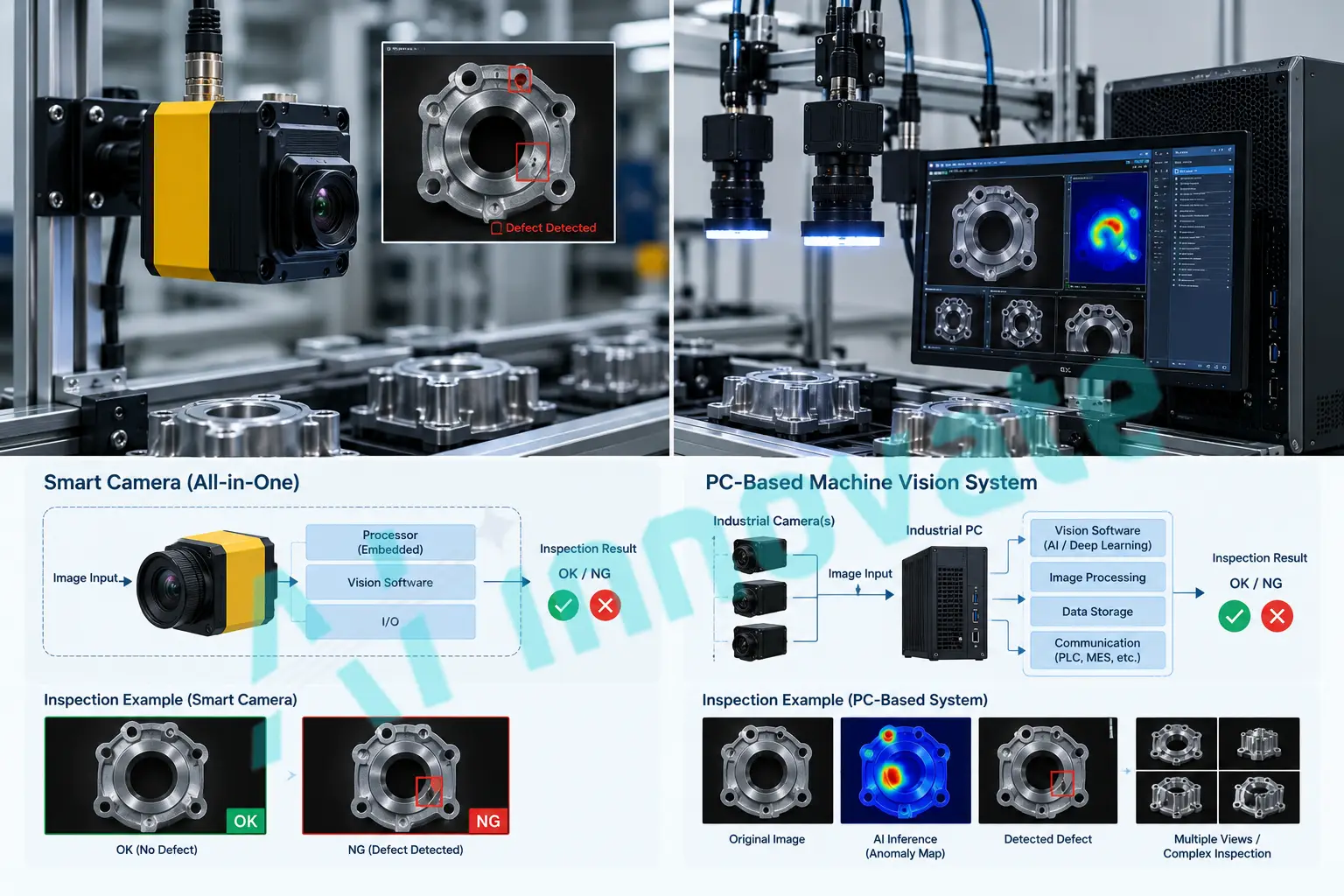
A smart camera is a self-contained unit. The imager, the processing intelligence, and the input/output capability all live inside a single housing. Because that format resembles an intelligent sensor more than a traditional camera, these devices are sometimes called vision sensors, though a true smart camera generally offers more programmable flexibility than a fixed-function vision sensor.
A PC-based system separates those functions. A camera, whether connected directly via USB, GigE, or CameraLink, or through a frame grabber board, feeds image data to a separate processor, typically an industrial PC or a dedicated vision controller. That separation is the entire architectural distinction, and nearly every practical trade-off between the two approaches traces back to it.
A third category sits between these two extremes: the embedded vision computer. This is a stand-alone box with its own frame storage and processing intelligence, similar in spirit to a PC-based system, but with the camera tethered to the unit rather than built into it, and often with more limited, application-specific flexibility than a full PC. It can typically handle multiple camera inputs, which a single smart camera cannot, while avoiding some of the complexity a full PC deployment carries.
Smart Cameras: Strengths and Real Limits
Where Smart Cameras Win
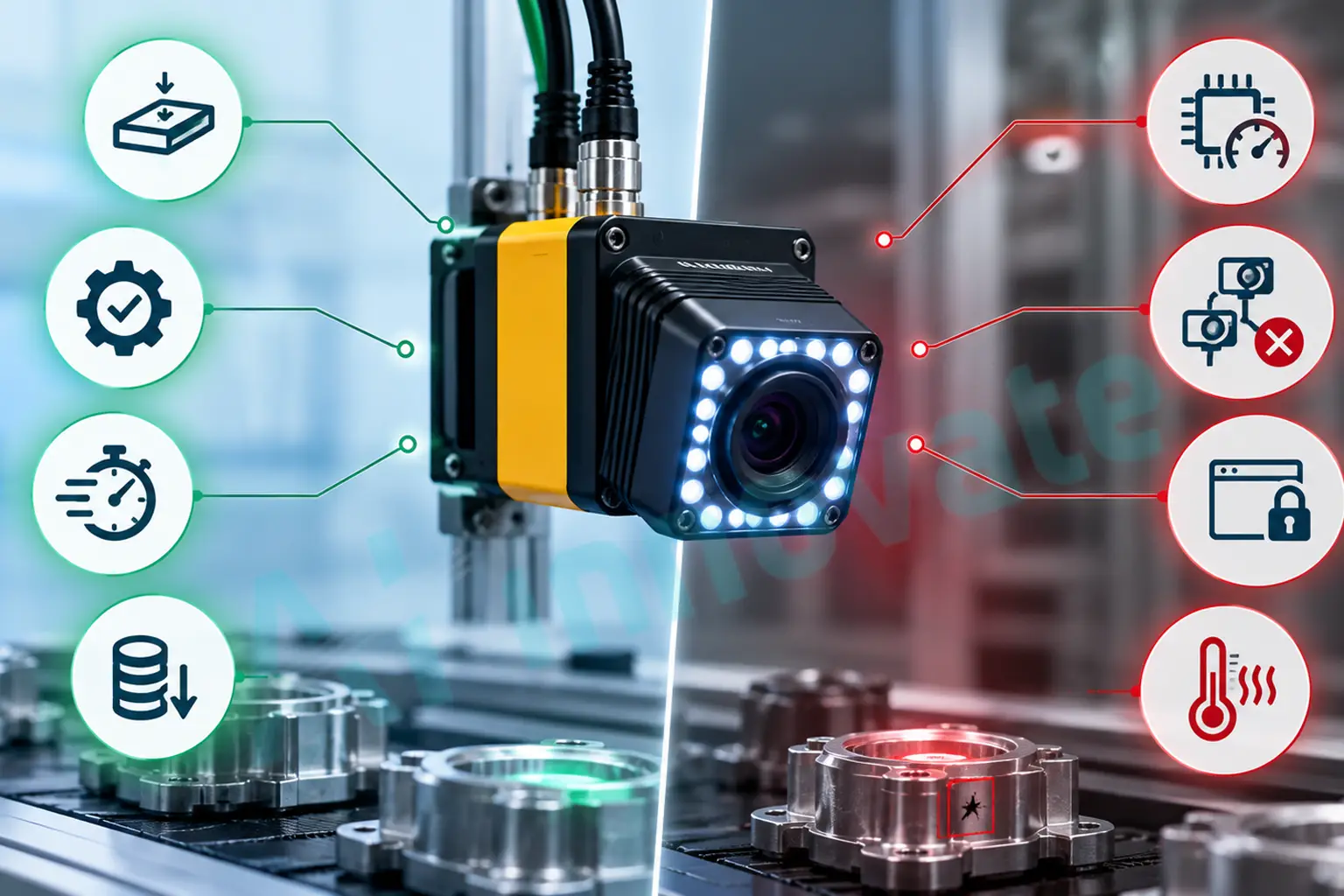
Smart cameras are generally less expensive to purchase and set up than an equivalent PC-based solution, since the camera, lens, processing, and often lighting all ship as one integrated unit rather than components sourced from separate vendors. That unified packaging also makes them notably easier to integrate into a manufacturing environment: fewer cables, fewer points of failure, and a physically compact footprint that matters when mounting space is tight or a camera needs to move with a robotic arm.
Reliability follows the same logic. With no fan, no hard drive, and lower internal operating temperatures than a full PC, smart cameras tend to run more reliably in harsh production environments, and their software tools are typically simpler, point-and-click configuration with pre-packaged algorithms rather than a full development environment. Because the processor sits directly at each inspection point, a network of smart cameras also distributes computational load naturally: only the inspection result needs to travel back to a central system, not the raw image data, which keeps bandwidth and central processing requirements low even across many inspection stations.
Where Smart Cameras Fall Short
The same self-contained design that makes smart cameras simple also caps their ceiling. Computational power cannot be exceeded once the unit is purchased. A smart camera is a single-socket device, meaning one camera per unit, which makes multi-camera applications expensive to scale compared to a PC-based system that can often manage four or more cameras through a single frame grabber. If a smart camera cannot handle an application as originally specified, there is generally no path to migrate that setup to a more powerful platform without starting over on both hardware and software.
Smart cameras also tend to offer a fixed, vendor-specific software ecosystem rather than the choice of third-party tools a PC-based system allows, and very high-speed or high-resolution applications, the kind found on fast beverage or can lines running well above a thousand parts per minute, frequently exceed what a smart camera’s onboard processing can sustain for full 100 percent inspection coverage.
PC-Based Systems: Strengths and Real Limits
Where PC-Based Systems Win
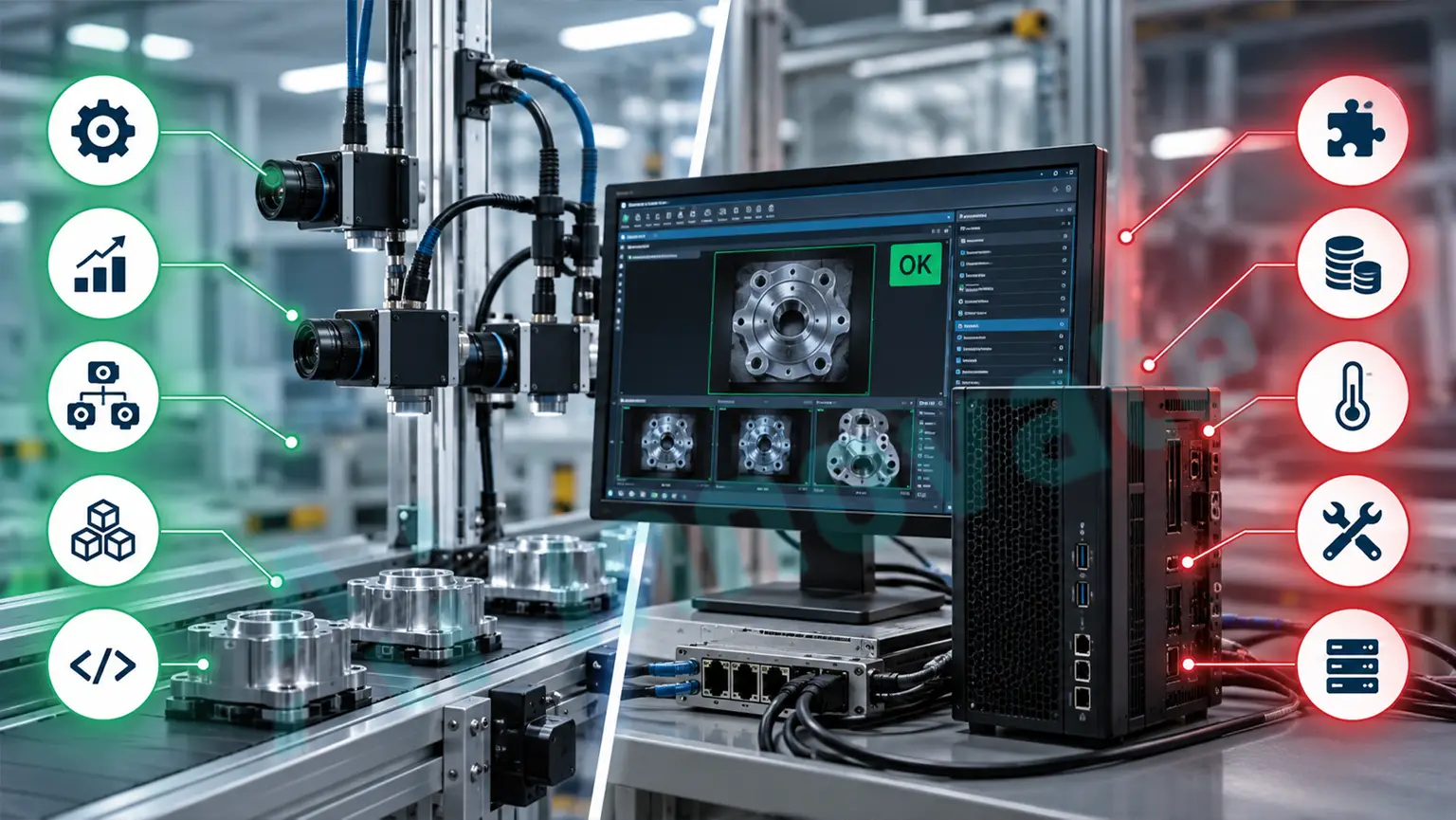
Flexibility is the defining advantage. A PC-based system can use line-scan or area-scan cameras interchangeably, run third-party software packages rather than being locked to a single vendor’s tools, and scale computational power simply by upgrading the PC itself. Because the platform is fundamentally open, its cost-to-performance ratio has historically been difficult for any closed, purpose-built device to match, and that gap widens further for applications requiring the heaviest processing: high-resolution sensors, complex deep learning models, or many simultaneous camera feeds.
PC-based systems also handle the scenario every experienced vision engineer eventually runs into: a project’s true requirements turning out to be more demanding than initially scoped. Because the PC platform has headroom built in by design, that kind of scope creep is a software or component upgrade rather than a full system replacement.
Where PC-Based Systems Fall Short
That flexibility comes at a real cost in complexity. A PC-based system typically involves a camera, a frame grabber or interface card, and a PC, often from three different manufacturers, which introduces compatibility, driver, and partial feature-support issues that a single-vendor smart camera simply does not encounter. Some very specific low-level camera functions, adjusting the electronic shutter frame by frame, for instance, are straightforward on a smart camera with direct sensor control and can be genuinely difficult to implement cleanly through a multi-vendor PC stack.
PC-based systems also carry more physical footprint and more points of potential failure: fans, hard drives, and higher operating temperatures that can degrade components over time in a harsh industrial environment. And despite the flexibility PC-based systems offer, they generally require real computer skills to configure and maintain, a meaningfully higher bar than the largely turnkey setup smart cameras are designed around.
The Architecture Trade-off at a Glance
| Factor | PC-Based | Smart Camera |
|---|---|---|
| Flexibility | Excellent, open platform, third-party software | Limited, vendor-specific toolset |
| Ruggedness | Lower, more moving components | High, fewer points of failure |
| Physical Footprint | Multi-box system, more cabling | Compact, single all-in-one unit |
| Functionality | Expandable | Fixed at time of purchase |
| Processing Power | Expandable via hardware upgrade | Fixed, capped by onboard hardware |
| Multi-Camera Scaling | Efficient, one frame grabber handles several cameras | Costly, one camera per unit |
| Ease of Setup | Requires computer and integration skill | Largely point-and-click |
| Typical Cost | Higher, especially at scale | Lower for single or few inspection points |
Real-World Cost Ranges in 2026
A single smart-camera inspection station, including lighting, optics, and integration, typically runs in the $10,000 to $50,000 range. Engineered PC-based systems, particularly those involving 3D sensors, deep learning software, multiple cameras, fixturing, and full line integration, commonly run $50,000 to $250,000 or more. That gap is not simply markup. It reflects the genuine difference in engineering complexity between a turnkey single-camera device and a custom multi-camera system with dedicated processing hardware, custom software, and full line integration.
It is worth noting that despite the rise of capable smart cameras, demand for high-end PC-based imaging hardware, frame grabbers and dedicated acquisition cards among them, has continued to grow rather than shrink. The explanation is straightforward: as smart cameras absorbed the simpler end of the application spectrum, high-resolution and high-frame-rate applications that exceed smart camera capability have grown to fill the gap, keeping demand for hardware costing well over $10,000 buoyant even as entry-level vision costs have fallen dramatically.
How Modern Smart Cameras Have Closed the Gap
The performance ceiling on smart cameras has moved dramatically since the earliest devices in this category, which relied on lower-performance processors constrained by size and heat dissipation. Modern smart cameras routinely embed ARM or DSP processors, and increasingly GPU accelerators as well. The Cognex In-Sight 3800, for example, integrates 4 GB of onboard memory with optional liquid-lens autofocus, while Photoneo’s MotionCam-3D smart camera includes an NVIDIA Pascal GPU with 256 CUDA cores for real-time 3D depth computation, a level of onboard compute that would have required a dedicated PC just a few years ago. Some smart cameras now even use AI-driven scoring to automatically configure their own lighting setup, adjusting internal LED configuration to optimize image quality without manual tuning.
This does not eliminate the fundamental trade-off between the two architectures, but it has meaningfully shifted where the line sits. Applications that once categorically required a PC-based system purely for processing headroom increasingly fit within a modern smart camera’s capability, which is precisely why the decision has to be based on the specific application’s actual requirements rather than an assumption about what smart cameras can or cannot do.
When to Choose Each Architecture
- Choose a smart camera when the application is well-defined and stable, involves a single camera or a small number of independent inspection points, needs to be deployed quickly with minimal integration engineering, and is unlikely to require significantly more processing power or functionality later.
- Choose a PC-based system when the application requires multiple synchronized cameras, involves heavy computational demand like deep learning inference on high-resolution images, needs the flexibility to evolve significantly as requirements are refined, or requires third-party software integration a closed smart camera platform cannot support.
- Consider a hybrid approach when different inspection points on the same line have genuinely different requirements. It is common and often the most cost-effective choice to deploy smart cameras at simple, well-defined checkpoints while reserving PC-based compute for the one or two stations on a line that genuinely need it, rather than forcing every station onto a single architecture.
The Hybrid Middle Ground: Embedded Vision Computers
For applications that need more than a single smart camera can offer but do not require the full flexibility of an open PC platform, embedded vision computers occupy a genuine middle ground. These are stand-alone units with their own frame storage and processing intelligence, generally supporting multiple tethered cameras, but built around a more limited, application-specific set of fixed routines than a full PC deployment. This makes them a reasonable fit for applications with predictable, well-understood requirements across a handful of camera positions, where a full PC-based system would represent more engineering flexibility than the problem actually calls for.
How AI-Innovate Works Across Both Architectures
The choice between smart camera and PC-based hardware determines where processing physically happens, but it should not determine what defect detection capability a manufacturer has access to. A well-designed inspection platform needs to run effectively on whichever architecture actually fits the line.
AIxEye: Detection That Runs on Either Architecture
AIxEye delivers real-time visual inspection whether deployed on a compact smart camera handling a single, well-defined inspection point or on a PC-based system managing multiple synchronized cameras and heavier processing demand, adapting to the compute envelope actually available rather than requiring one specific hardware architecture.
AIxAm: Dimensional Inspection Where the Application Demands It
AIxAm supports the 3D surface and geometry inspection use cases that most often push a deployment toward PC-based or GPU-equipped smart camera hardware, comparing captured geometry against CAD reference models for the dimensional verification applications covered in more depth in our 2D vision vs 3D vision systems comparison.
AIxCore: Edge Processing Sized to the Hardware Available
AIxCore handles the on-site inference layer regardless of whether that inference runs on a GPU-equipped smart camera or a dedicated PC-based edge system, an architecture decision covered in detail in our edge AI deployment guide, which walks through sizing compute correctly for the actual throughput and latency a line requires.
Final Thoughts
Smart cameras and PC-based systems represent two genuinely different points on the same design continuum, not a strictly better and worse option, and the right choice depends entirely on how well-defined the application is, how many cameras it requires, and how much computational headroom it genuinely needs both today and as requirements evolve.
The manufacturers who get this decision right are not the ones defaulting to whichever architecture their integrator sells by default. They are matching the architecture to the actual shape of the problem: a smart camera for a stable, single-point inspection task where simplicity and reliability matter most, a PC-based system where scale, flexibility, or heavy computation genuinely justify the added complexity, and increasingly a deliberate hybrid of both across a single production line where different stations have genuinely different requirements. Getting that match right the first time avoids both the smart camera that outgrows its capability in six months and the PC-based system that was never actually needed. For a deeper look at how to plan a vision deployment from the ground up, our Vision System Guide for Manufacturers covers the budget and decision framework that should come before this specific hardware choice.
Frequently Asked Questions
What is the main difference between a smart camera and a PC-based machine vision system?
A smart camera integrates the imager, processing, and input/output capability into a single self-contained unit. A PC-based system separates the camera from the processing, connecting one or more cameras to a separate industrial PC or vision controller, which offers greater flexibility and scalability at the cost of more integration complexity.
Are smart cameras less capable than PC-based systems?
Not necessarily anymore. Modern smart cameras increasingly embed GPU accelerators and several gigabytes of memory, closing much of the performance gap that once existed. However, smart cameras remain fixed in processing power once purchased and are single-camera devices, while PC-based systems can scale processing and camera count as requirements grow.
How much does a smart camera inspection station cost compared to a PC-based system?
A single smart camera station, including lighting, optics, and integration, typically costs $10,000 to $50,000. Engineered PC-based systems with multiple cameras, 3D sensors, or deep learning software commonly run $50,000 to $250,000 or more, depending on complexity.
Can a smart camera handle multi-camera inspection applications?
Not efficiently on its own, since a smart camera is inherently a single-socket device with one camera per unit. Applications requiring several synchronized cameras are generally better served by a PC-based system, which can typically manage four or more cameras through a single frame grabber or interface.
What is an embedded vision computer, and how does it differ from a smart camera?
An embedded vision computer is a stand-alone processing unit with its own frame storage and intelligence, similar to a PC-based system, but with the camera tethered externally rather than integrated into the unit. It generally supports multiple camera inputs like a PC-based system, while offering a more limited, application-specific set of functions than a full open PC platform.
Should a production line use only one architecture, or can smart cameras and PC-based systems coexist?
They can and often should coexist. It is common and frequently the most cost-effective approach to deploy smart cameras at simple, well-defined inspection points on a line while reserving PC-based compute for the one or two stations that genuinely require heavier processing or multi-camera synchronization.
Sources
Ai-Innovate uses only high-quality sources, including peer-reviewed studies, to support the facts within our articles.
- Zuech, N. AIA (Association for Advancing Automation). Smart Cameras vs. PC-Based Machine Vision Systems. https://www.automate.org/vision/industry-insights/smart-cameras-vs-pc-based-machine-vision-systems
- Wevolver. (2026). Top Vision Systems for Manufacturing in 2026. https://www.wevolver.com/article/top-vision-systems-for-manufacturing-in-2026
- Relling Systems. (2026). Best Machine Vision Systems for Inspection (2026): Compared. https://rellingsystems.com/resources/robots/machine-vision